Placement & Routing
klayout-draw-mcp is not a P&R engine, but it provides the building blocks for one and
ships a skill of recipes so an assistant can place and route well. The division of labour:
the assistant plans the floorplan, net list and routing order; the server realises
geometry and checks DRC. The loop is route → drc_check → fix → repeat.
These tools were added in 0.1.2.
Building-block tools
| Tool | Purpose |
|---|---|
create_cell(name) |
Create/select a cell as the active drawing target |
use_cell(name) |
Switch the active drawing cell (e.g. back to the top) |
place_cell(cell, x, y, orient, mag, nx, ny, dx, dy) |
Place an instance or nx×ny array of a cell |
add_via(x, y, bottom_layer, top_layer, cut_layer, …) |
Via: cut array + enclosing metal on two layers |
add_wire(layer, points, width) |
Manhattan wire — auto-inserts L-corners between points |
A typical multi-layer route by hand:
create_cell("INV"); … add_box(...) …; use_cell("TOP")   # define + return
place_cell("INV", 0, 0, nx=3, ny=2, dx=1.5, dy=3.0)      # place a 3×2 block
add_wire(9, [[0.5, 2.0], [3.0, 2.0], [3.0, 5.0]], 0.2)   # M1, auto corner
add_via(3.0, 5.0, bottom_layer=9, top_layer=12, cut_layer=11, rows=2, cols=2)
add_wire(12, [[3.0, 5.0], [6.0, 5.0]], 0.3)              # M2
Automatic routing (maze / Lee)
For many nets and obstacle avoidance, the assistant runs an obstacle-aware maze router in
run_script: it marks cell footprints and routed nets as blocked grid nodes, then finds a
shortest Manhattan path per net (with a turn penalty so routes stay straight). The demo
below places six cells in two rows and routes a five-net chain that weaves through the
routing channels between cells:
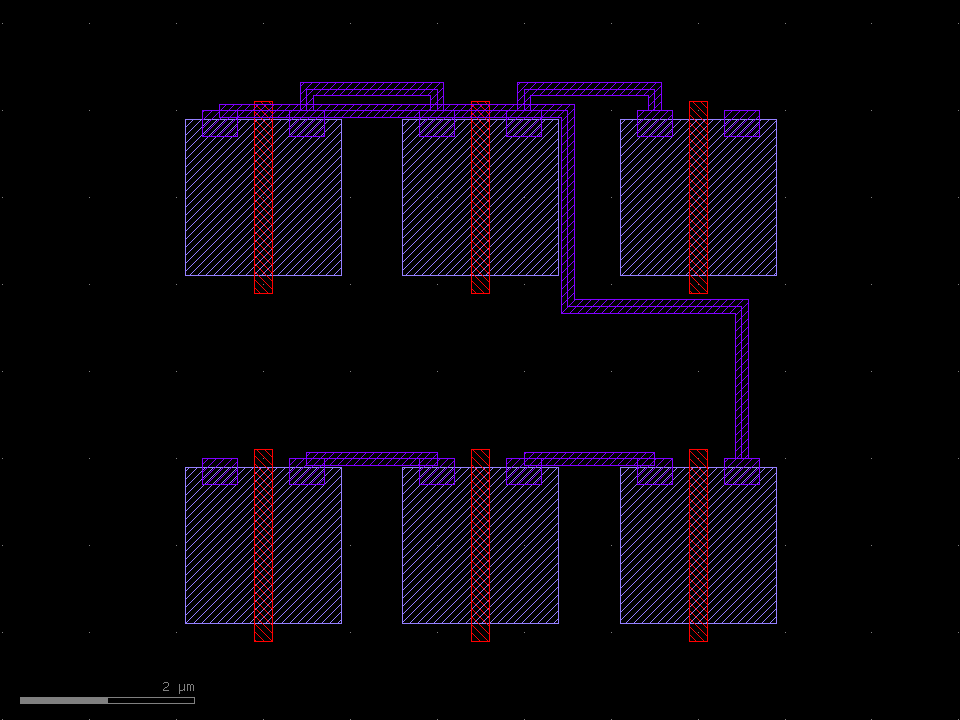
The router, placer and helpers live in the klayout-pnr skill
(skills/klayout-pnr/):
pnr_helpers.py— layer map,draw_box/draw_wire/draw_via,RoutingGridplacer.py—place_rows,power_railsmaze_router.py—lee,route_net(the algorithm above)demo_pnr.py— the end-to-end demo that produced the image (uv run python skills/klayout-pnr/scripts/demo_pnr.py out.gds)
The skill's SKILL.md documents the workflow and includes a self-contained router you can
paste straight into run_script. Install it with:
DRC in the loop
After routing, verify and iterate:
drc_check([
  {"type": "spacing", "layer": 9, "min": 0.2},   # M1 spacing
  {"type": "width",   "layer": 9, "min": 0.1},   # M1 width
  {"type": "overlap", "layer": 9, "layer2": 6}   # M1 must not sit on POLY
])
Violation centres come back as coordinates, so the assistant can rip up and reroute the offending nets — greedy routing means net order matters, so route congested/long nets first.